
Learn

- Share:
-

-

-

-


How to Build and Maintain a Secure Website

A high-performance website can expand your company’s reach and strengthen customer trust, but it can also expose valuable data, systems and relationships to attack. Verizon’s 2025 Data Breach Investigations Report analyzed 12,195 confirmed breaches and found concerning statistics specific to small businesses.1
- 43% of cyberattacks target small businesses.
- Small businesses are attacked more than 4x as often as larger organizations.
- 88% of SMB breaches were ransomware.
These statistics underscore why strong website security is essential to protecting customers, operations, reputation and revenue.
What is a secure website?
A secure website encrypts data in storage and in transit, and limits access to sensitive information with multifactor authentication (MFA). Regular patching, scanning and a tested incident response plan keep the site current.
How can you tell if a website is secure?
A secure website will feature a lock icon in the browser's address bar and "https" in the URL. HTTPS, which stands for “Hypertext Transfer Protocol Secure” also gives a site a boost in search engine rankings. However, HTTPS is only a baseline level of cybersecurity. Further controls, such as MFA, firewalls, access restrictions, vulnerability scanning, automated patching and continuous threat monitoring strengthen site security.
Does every website need MFA?
The right level of verification depends on what the site handles. For example, a news site may need nothing more than a simple password. However, a retailer should protect customers' credit card data with MFA, which asks for a password plus another factor, such as a security code from an email or text, a fingerprint or a face scan.
You don’t need to become a security expert if you work with a trusted development partner with a good cybersecurity track record.
What should you look for in a host or developer?
Start with a web hosting company that has a strong focus on security. Use trusted providers and ask them to show you how they secure their own site. General-purpose freelancer sites that display provider reviews can also be a good source for web developers and designers. Even with a do-it-yourself website provider, interview the company about its security offerings first. There are other important factors you should consider.
- Reputation
Look for providers you know and trust with a well-established record of building secure websites.
- Certifications
Check for third-party security certifications such as System and Organization Controls 2 (SOC 2). SOC 2, which includes Type 1 or Type 2, is an independent audit framework that evaluates how effectively a service provider protects customer data based on criteria for security, availability, processing integrity, confidentiality and privacy. ISO/IEC 27001 is an international standard for managing and protecting sensitive information.
For most small businesses, SOC 2 Type II and ISO/IEC 27001 are the strongest general indicators. However, if your website accepts card payments, confirm that the applicable services are PCI DSS compliant. Also verify that each report or certificate is current, covers the specific service being purchased and was issued or assessed by a qualified independent organization.
- Developer location and screening
To reduce risk, consider U.S.-based developers who have passed security screenings and built a good record of secure work.
Whether you use a host's design templates, build the site yourself or hire outside developers, your site should offer the strongest security available based on its function.
How do you protect a website from AI-powered threats?
Secure contact forms, as well as using MFA and software that is easy to update to help your site withstand AI-powered attacks.
- Block deceptive bots and impersonation.
AI-generated deepfake emails, messages and videos can impersonate customers and employees to request valuable information. Use secure contact forms with CAPTCHA or reCAPTCHA and require MFA checks before processing any sensitive requests.
- Plan for regular updates.
AI can help hackers find weaknesses in outdated software. So, choose a content management system that accommodates frequent updates.
- Vet AI plugins.
To reduce the risk of unsecure or malicious codes used in AI-powered attacks, assess plugins. Only use third-party plugins from sources whose security practices you trust.
These safeguards combine stronger identity verification, timely software maintenance and careful screening of third-party tools to reduce exposure to AI-enabled attacks.
How do you keep a website secure?
To keep your website secure, use a trusted hosting provider, apply security patches promptly and regularly scan for vulnerabilities. Require MFA and zero trust access controls to protect sensitive areas and limit each user’s permissions. Maintain an incident response plan so your business can contain, assess and recover from a website security breach.
What is zero trust and how do you apply it to a website?
“Zero trust” means never allowing a device access to sensitive areas of a website without verification, even if the device is on your network or has accessed those areas before. Putting zero trust into practice requires a consistent, security-first approach.
- Require strong, unique logins with MFA every time a user seeks access to sensitive information.
- Segment administrative functions so users see only what they're authorized to access.
- Update user permissions regularly.
Who is responsible for installing security patches?
Your web hosting company should install all security patch releases on a schedule. Ask any provider you're considering whether it applies patches automatically.
How often should you check your website for vulnerabilities?
In addition to your host’s maintenance schedule, run cybersecurity checks regularly. Many providers offer website security checks and scanning tools, but choose tools that are widely used and trusted, updated often and feature transparent privacy policies.
What should be included in a website incident response plan?
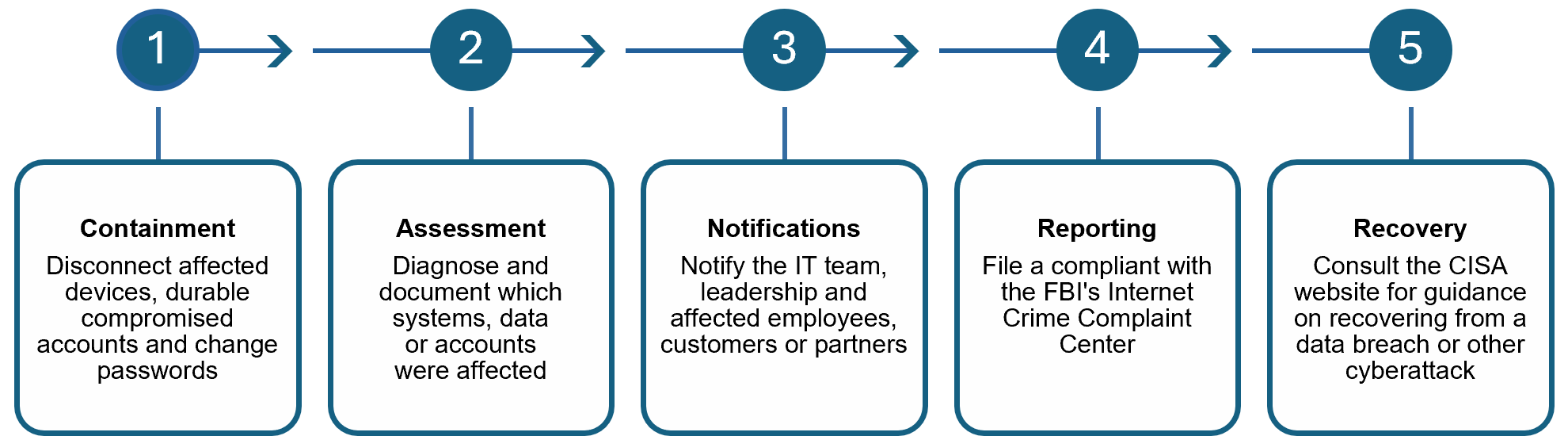
An incident response plan should explain how your business will stop an attack from spreading, determine its impact, communicate with affected parties, meet reporting requirements and restore operations.
Responding to a Cyberattack
Where can small businesses find cybersecurity resources?
Building a secure website should be a priority for every company, large or small. A wealth of outside resources is available to small business owners who lack the expertise to do it alone. Company owners can consult the Cybersecurity and Infrastructure Security Agency’s “Cyber Guidance for Small Businesses” and “Secure Your Business” pages. The Federal Trade Commission also offers a “Cybersecurity for Small Business” page on the Federal Trade Commission's website.
Choose a partner you can trust to help protect your data.
The financial professionals at Synovus offer solutions to help your company protect valuable assets and transact business with peace of mind. To learn more, call 1-888-SYNOVUS (1-888-796-6887) or visit your local branch.
Important disclosure information
This content is general in nature and does not constitute legal, tax, accounting, financial or investment advice. You are encouraged to consult with competent legal, tax, accounting, financial or investment professionals based on your specific circumstances. We do not make any warranties as to accuracy or completeness of this information, do not endorse any third-party companies, products, or services described here, and take no liability for your use of this information.
- Verizon, “2025 Data Breach Investigations Report” Back
Do you have questions or ideas?
Share your thoughts about this article or suggest a topic for a new one